Move your books from QuickBooks
Bring over accounts, customers and vendors, starting balances, and open invoices and bills. No QuickBooks password needed.
 Fiscally Fit Business, by Argent AI Services
Plain-English, double-entry bookkeeping for small businesses, with invoicing and online payments built in. Upload your bank and card statements and AI suggests a category for every line, with its reason. You approve, it learns your rules, and your accountant gets reports that tie out.
No card needed to start. Then $99 a month or $990 a year, for up to 3 companies, or $29 a month on Solo for businesses with up to $100,000 a year in income. Cancel any time.
October statement
As your bank sends it
PDF, CSV or OFX
| 10/19 | AMZN MKTP US*2K4LZ0 | -38.99 |
| 10/23 | CITY OF CUMMING BUSINESS LIC | -125.00 |
| 10/27 | NAPA AUTO PARTS 4471 | -118.40 |
Sorted for you
1 posted, 1 to approve, 1 for you
Your ruleMatches “AMZN MKTP US”, so it posted on its own.
AI 40%Not sure what this is. Pick the right category once and a rule will remember it.
AI 80%Auto parts store: truck upkeep.
Download a statement from your bank or card website as Excel, CSV, OFX, QFX or QBO. Only have a PDF? AI reads every line and checks the balances add up.
Lines that match your rules or something already in your books post on their own. For the rest, AI suggests a category, says how sure it is and gives its reason.
Fix any that are wrong and approve the rest in one click. Each fix teaches a rule, so next month asks less of you.
Reconcile to the statement, run your reports, and send your CPA one download with everything they need, checked that it ties out.
Real screens from the app, in Demo Excavating Co., the made-up company our help library uses. Click any picture to see it full size.
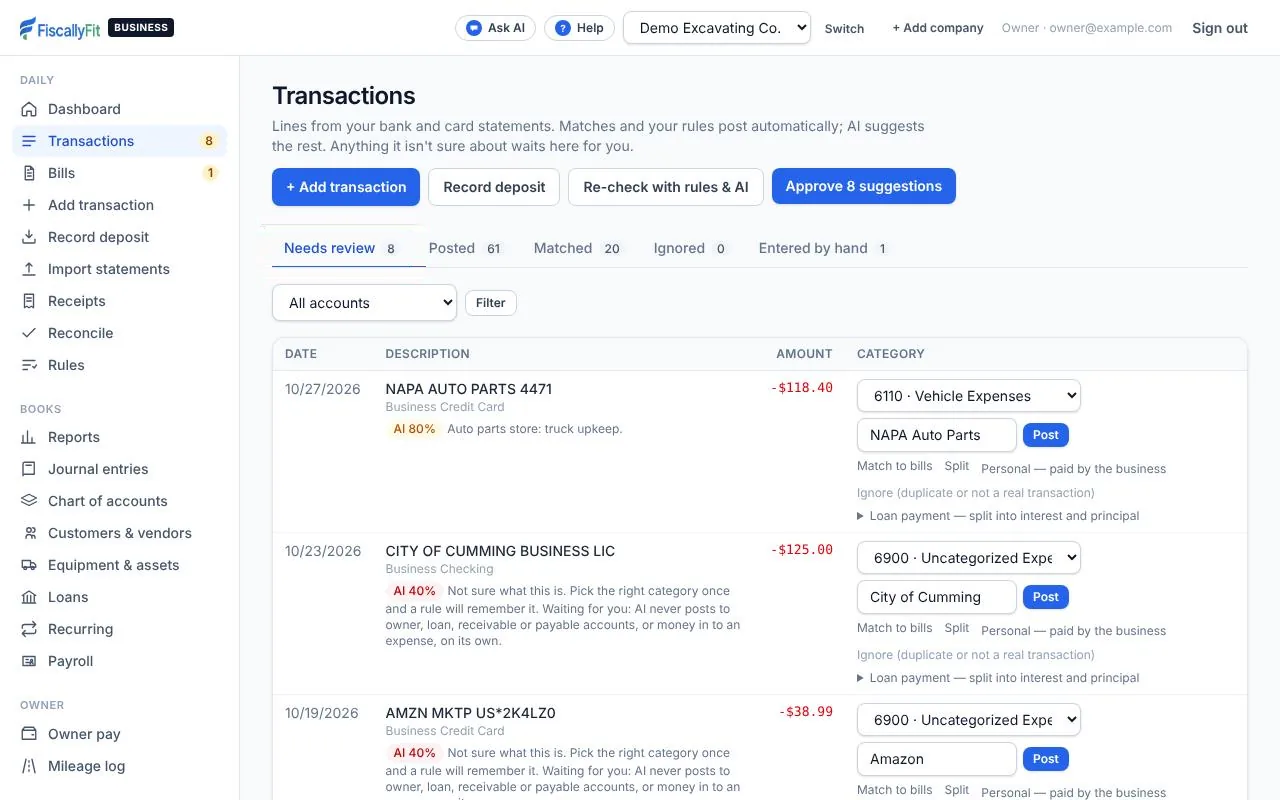
Every line the AI wasn't sure enough to post shows its suggested category, how sure it is and why. When it doesn't know, it says so and waits for you.
AI suggests, you approve. Rules you set, and lines that match entries already in your books, post automatically. A personal charge on the business card is one click: Personal — paid by the business.
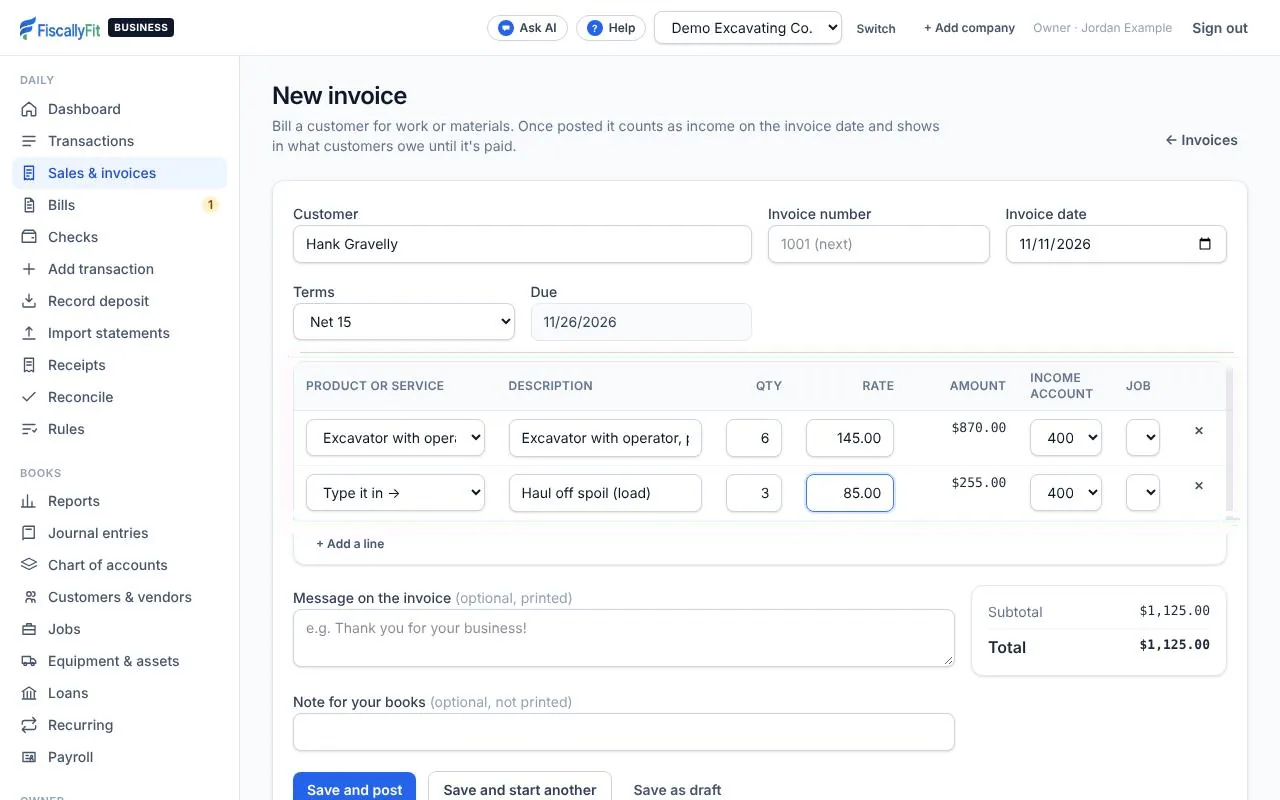
Bill a customer with your logo, terms, discounts, sales tax and a job on each line, then download the PDF or email it. Customers can accept an estimate online, and it becomes an invoice in one click, or several if you bill in parts.
Connect your own Stripe account and every invoice carries a Pay now link for card or bank. Sales receipts, credit memos, statements, reminders and recurring invoices are on the same Sales page.
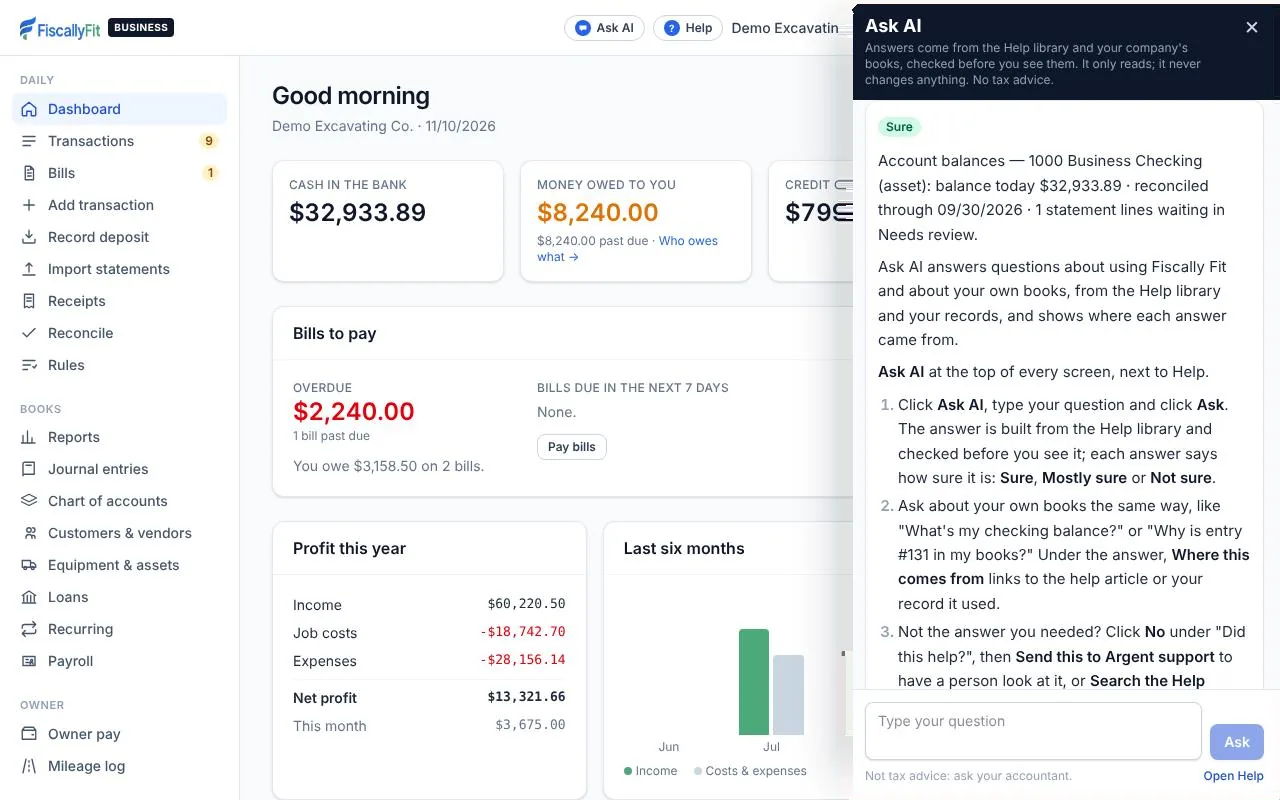
Ask how to do something, or ask about your own numbers. Each answer says how sure it is and where it came from. Ask AI only reads; it never changes anything.
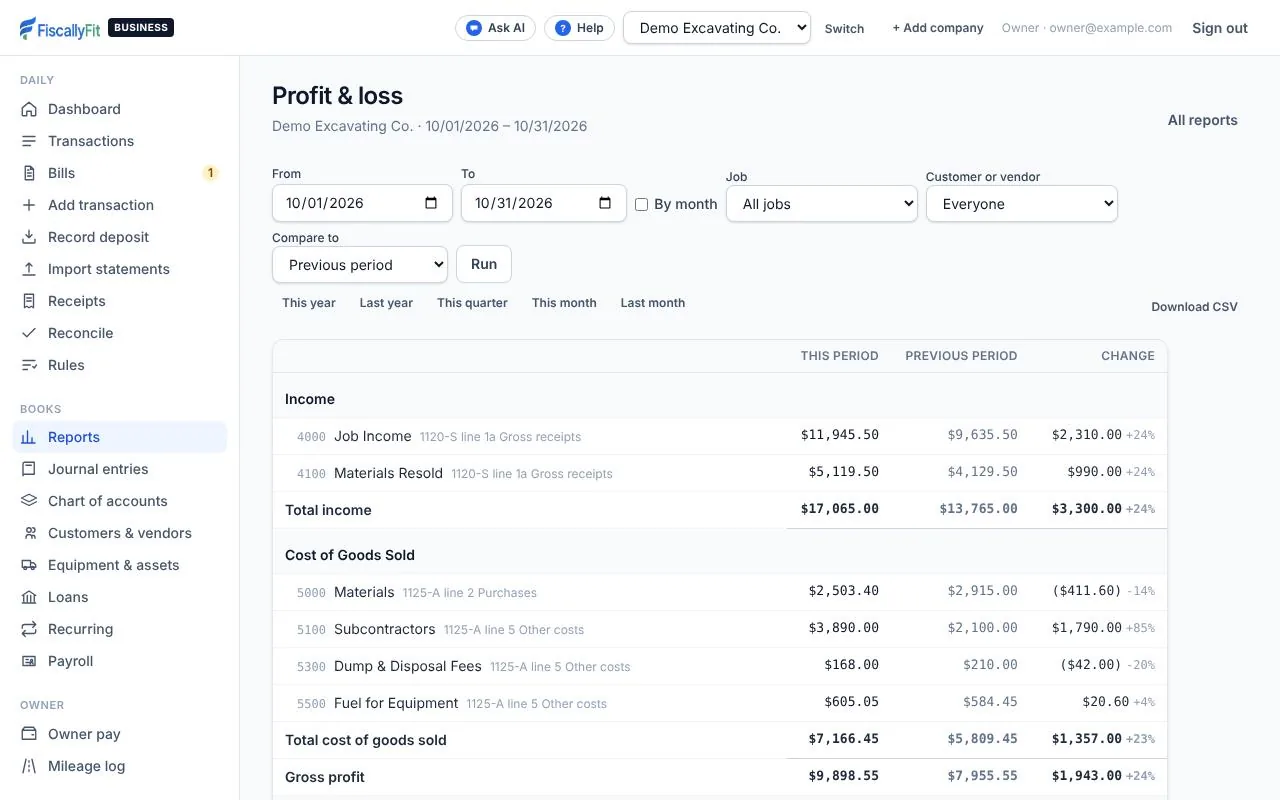
Profit and loss against the previous period or last year. Each account shows its tax-form line, and any amount opens the entries behind it.
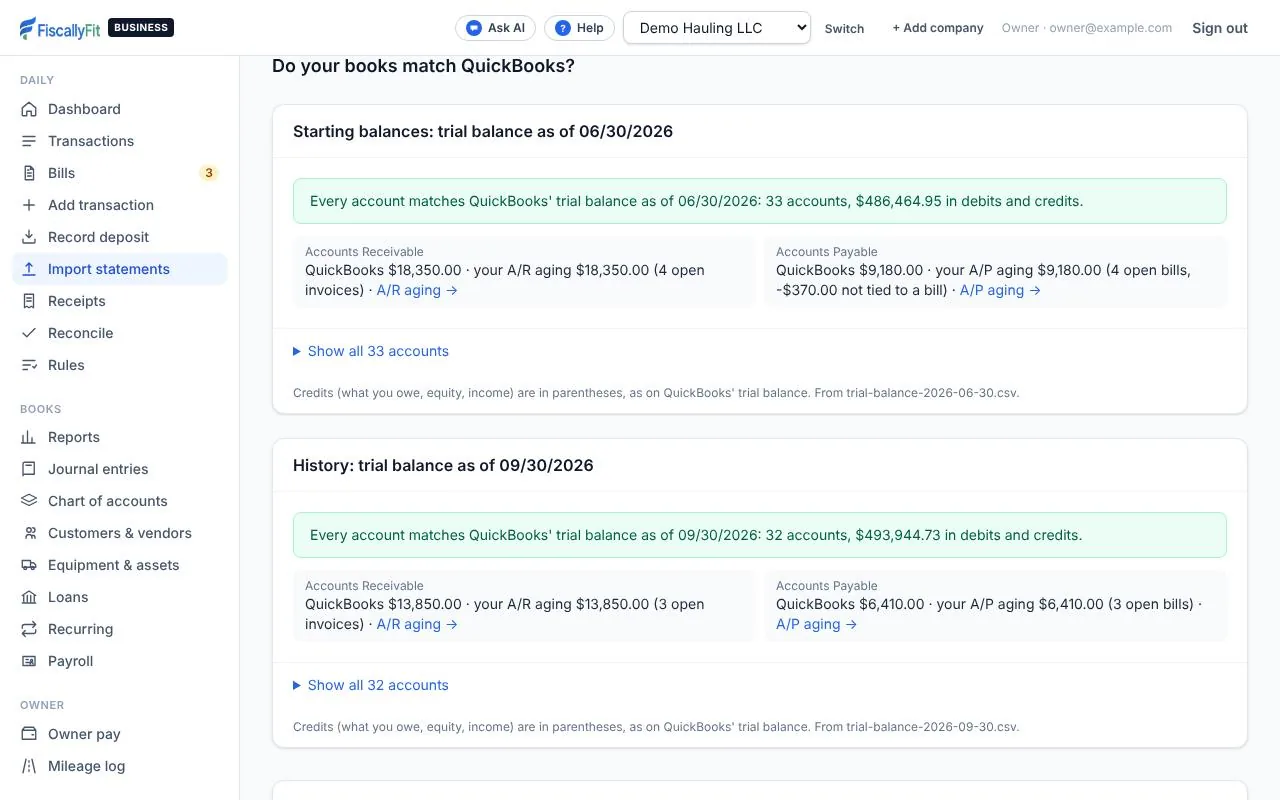
After you bring your books over, every account is checked against QuickBooks' own trial balance.
Underneath, it's the double-entry accounting your CPA expects: every entry balances, and posted entries can't be quietly changed. On screen, buttons say what they do, like Match to bills and Record deposit.
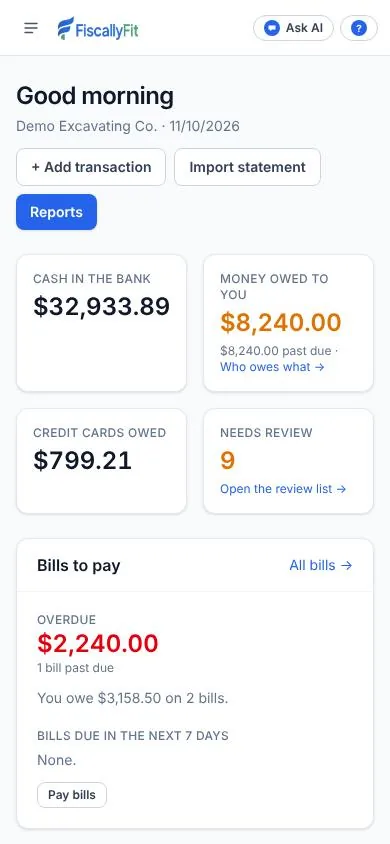
Add it to your phone's home screen and it opens like an app, so you can approve lines and snap receipts away from the desk.
Invoices with your logo, terms, discounts, sales tax and a job on each line, in one of three styles, as a PDF or by email. Customers accept an estimate online by typing their name, and you can bill it in parts, holding back retainage. Sales receipts and refunds cover sales paid on the spot.
Every invoice can carry a Pay now link. Customers pay by card or bank through your own Stripe account, and the payment, Stripe's fee and the payout go into your books by themselves. Argent adds nothing to Stripe's fee.
Payment reminders for overdue invoices, late fees added to them automatically (switch them off for any customer), customer statements by email, and invoices that repeat on a schedule.
Enter bills, apply vendor credits, and pay by check printed on voucher check paper, or record a payment you made at the bank. Bills over an amount you set can wait for an approver.
Bills, expenses, checks and journal entries that post on a schedule, remind you first, or wait as a template you use when you need it.
Switch them on in Settings. Quantity on hand, first-in, first-out cost and cost of goods sold with each sale, reorder points, purchase orders and inventory reports.
A timer on your phone, weekly timesheets, and billable time turned into an invoice. Labor cost shows for every job, from each person's cost per hour.
Your bank balance for the next 90 days, from open invoices and bills, recurring items, loan payments and what-ifs you add.
Upload Excel, CSV, OFX, QFX, QBO or PDF statements. AI suggests each category with its reason, and rules you can see and change post the rest.
Sub-accounts, up to 12 custom fields, products and services, and a search box on Transactions. Bring customers, vendors, products and accounts in from a spreadsheet.
Attach a contract, photo or PDF to an invoice, bill, check, entry, statement line, customer or vendor.
Divide one charge across several categories or jobs, like a supply-store run that was part materials and part shop tools.
Snap a photo or upload a PDF. AI reads the vendor, date and total and attaches the receipt to its card or bank charge.
Tag income and costs to a job and compare it with the job's budget. Classes give you a P&L by department or location.
Pick your kind of business and how it files. Every account in your chart is tied to its line on the 1120-S, Schedule C or 1065.
Enter the statement's ending balance and finish when the difference is $0.00. Reconciled lines are locked so they can't change by accident.
You or your accountant can write off old unpaid invoices to bad debt in one go, and move many lines to another account or class at once, with Undo.
P&L, balance sheet, cash flow, agings, job profit, budget vs actual, trial balance and general ledger. Save a report, download the main ones as PDFs, or have them emailed weekly or monthly.
W-9s, 1099 boxes by account, the 1099-NEC file for the IRS's IRIS system and Copy B PDFs for your contractors. 1099 e-file from Fiscally Fit Business is coming.
An Excel workbook, PDF financial statements and the general ledger, checked that it all ties out, plus a checklist before you close the year.
Fixed assets with depreciation posted every month, loan payments split into interest and principal on their own, and a budget for the year.
Keep Gusto, ADP, QuickBooks Payroll or your CPA, and upload the register; Social Security and bank numbers are left out, and the withdrawals match on the statement.
See what you've taken out, log trips at the IRS rate for each date, and track sales tax if you charge it.
AAA, shareholder basis and officer pay worksheets for your CPA, and combined reports for companies you own together, with intercompany amounts taken out.
Owner, Admin, Bookkeeper and Accountant, Reports only and Time tracking only users, or a role you build from a list of permissions.
Sign in with a code from an authenticator app. Every change is logged, and the log can't be edited or deleted.
A read and write API with webhooks, so other software can read your records and add customers, vendors, invoices and expenses. FieldQuote connects on its own.
Help for the page you're on, more than 170 step-by-step guides with videos, and Ask AI. When Ask AI can't help, chat live with a person at Argent.
QuickBooks' offer today is half price for 3 months on every paid plan, then the full price. Here's how the two compare on what a small business uses every month.
$99 a month, or $29 on Solo, includes invoicing, inventory, time tracking, jobs with budgets and labor cost, classes, purchase orders, custom roles and fixed assets. QuickBooks puts projects, labor costs, classes and purchase orders on Plus ($140), and custom roles and fixed assets on Advanced ($340).
Invite your bookkeeper and accountant at no extra cost. QuickBooks allows 1 user on Simple Start, 5 on Plus and 25 on Advanced, plus 2 or 3 accountants.
One subscription covers up to 3 companies you own. Each QuickBooks company is its own subscription.
Customers pay invoices by card or bank through your own Stripe account at Stripe's standard rates, and Argent adds nothing. A bank payment costs 0.8% with a $5 cap; QuickBooks Payments lists 1% for bank transfers.
Your price doesn't change after the first 3 months. QuickBooks Plus is $70 a month for 3 months, then $140.
Solo is $29 a month for businesses with up to $100,000 a year in income, with every feature, for you and your bookkeeper or accountant. QuickBooks Simple Start is $38, with time tracking on Essentials, purchase orders on Plus and inventory a paid add-on.
| Feature | Fiscally Fit Business | QuickBooks Online |
|---|---|---|
| Price and people | ||
| Monthly price | $99 with every feature, or $990 a year. Solo: $29 with every feature, for businesses with up to $100,000 a year in income | Simple Start $38, Essentials $85, Plus $140, Advanced $340 |
| Introductory price | None. A 30-day free trial, then $99, or $29 on Solo | Half price for 3 months on every paid plan, then the full price |
| Free plan | No free plan. The 30-day trial has every feature | Free for one self-employed user: 2 invoices and 1 estimate a month, 1 bank account, no accountant access. Lite is $20 |
| Features by plan | Every feature on every plan, Solo included | Projects, budgets, classes, labor costs and purchase orders start at Plus; fixed assets, custom roles and workflows at Advanced |
| Companies | Up to 3 companies you own on one subscription | Each company is its own subscription |
| People | Invite your bookkeeper and accountant, no charge per person | 1 user on Simple Start, 3 on Essentials, 5 on Plus, 25 on Advanced, plus 2 accountants (3 on Advanced). Free and Lite: no accountant access |
| Online payment fees | Stripe's standard rates, nothing added by Argent: 2.9% + 30¢ a card payment; 0.8% a bank payment, capped at $5 | QuickBooks Payments: 2.99% an invoiced card payment; 1% a bank transfer ($1 minimum) |
| Everyday bookkeeping (both have it) | ||
| Statement upload | Excel, CSV, OFX, QFX, QBO or PDF; AI reads PDFs | All plans, including PDF and photo statements read by AI |
| AI categories | Suggests each category with its reason and how sure it is; rules you can see and change. Ask AI answers from your own books, up to a daily limit | Intuit Intelligence: expense categorizing from Simple Start; its AI chat is in beta with limited capacity; AI reconciliation on Plus |
| Invoices and sales forms | Included: invoices with your logo and discounts in three styles, estimates, sales receipts, credit memos, refunds, statements, payment reminders and recurring invoices | All plans; payment reminders from Essentials |
| Estimates accepted online | Included: the customer accepts by typing their name as a signature, or declines with a reason | E-signature on estimates from Simple Start |
| Late fees | Automatic, added as a line on the overdue invoice, with a switch for each customer | Yes, added as a line on the invoice, with settings for each customer |
| Progress invoicing and retainage | Included: bill an estimate in parts, hold back retainage and bill it when it's due | Progress invoicing from Simple Start; AIA-style billing on Advanced |
| Online invoice payments | Pay now on every invoice, card or bank, through your own Stripe account; payments, fees and payouts post by themselves | QuickBooks Payments on every plan |
| Bills and checks | Included: bills, vendor credits, recurring bills and printed checks | All plans; recurring bills from Essentials |
| Recurring templates | Bills, expenses, checks and journal entries on a schedule, as a reminder or used when you need them, plus recurring invoices | Yes: scheduled, reminder or unscheduled |
| Attachments | On any record: invoices, bills, checks, entries, statement lines, customers and vendors | All plans |
| Time tracking | Included: a timer on your phone, weekly timesheets, and billable time put on an invoice | From Essentials |
| Cash-flow planner | 90 days ahead, from open invoices and bills, recurring items, loans and your what-ifs | From Simple Start |
| Sub-accounts | Included | All plans |
| Reports | Drill down, compare periods, save, download PDFs and email on a schedule | Save on all plans; email on a schedule from Essentials; more reports on Plus and Advanced |
| Bad-debt write-off and bulk reclassify | For you and your accountant: write off many old invoices at once, and move many lines to another account or class | Accountant tools in Intuit Accountant Suite; reclassify is also in Advanced |
| 1099s | W-9s, the 1099-NEC file and Copy B PDFs. 1099 e-file coming | E-file through Contractor Payments ($25 a month), payroll or Bill Pay; included with Bill Pay Elite on Advanced |
| Imports | From a spreadsheet (CSV or Excel): customers, vendors, products, accounts and bank lines. From Xero: your books, checked against Xero's trial balance | Spreadsheet import; Xero through Intuit's partner Dataswitcher |
| API and webhooks | A read and write API with webhooks, so other software can read and add records | Yes |
| Live chat with a person | Included: when Ask AI can't help, chat with Argent's support team | Yes |
| Where Fiscally Fit Business does more | ||
| Bill approvals | Included: bills over an amount you set wait for your approver before they can be paid | Advanced, or Bill Pay Elite ($45 a month) on other plans |
| Inventory | Included: quantity on hand, first-in first-out cost, cost of goods sold and inventory reports; your items come over from QuickBooks | Plus and Advanced; a paid add-on on Simple Start and Essentials |
| Custom fields | Up to 12 | 1 on Simple Start, 4 on Essentials and Plus, 12 on Advanced |
| Jobs, job budgets and classes | Included | Projects and classes from Plus (up to 40 classes and locations; unlimited on Advanced) |
| Labor cost by job | Included: hours times each person's cost per hour, for every job | Plus and Advanced |
| Budgets | Included | Plus and Advanced |
| Purchase orders | Included: send as a PDF or by email, then receive onto a bill, check or expense | Plus and Advanced only |
| Fixed assets and depreciation | Included, posted every month | Advanced only |
| Loan payments | Split into interest and principal on their own | You split each payment yourself |
| S-corp AAA and shareholder basis | Included | Not offered |
| Combined reports for related companies | Included, with intercompany amounts taken out | Needs Intuit Enterprise Suite, priced by quote |
| Custom roles | Included: build a role from a list of permissions, plus Reports only and Time tracking only users | Advanced only. Reports and Time tracking only users don't count toward the user limit |
| Posted entries | Locked. Mistakes are fixed with a reversing entry, and the audit log can't be changed | Can be edited or deleted; the audit log records it |
Fiscally Fit Business fits owners who want every bookkeeping feature at one price, their bookkeeper and accountant in the books, and more than one company.
Moving over takes a few QuickBooks reports and nine short steps, each with a video. Your products, inventory, projects and classes come too. Coming from Xero or a spreadsheet? Those import as well.
See the step-by-step switch guideQuickBooks Online prices and plan details are from Intuit's pricing and offer pages on November 11, 2026, and Intuit's help pages on November 12, 2026: US list prices per company per month, after the 3-month introductory discount. Where Intuit doesn't say which plans have a feature, the table says Yes. Payment fees are from stripe.com/pricing and Intuit's QuickBooks Payments fees page on November 12, 2026, for US domestic cards; Stripe adds 1.5% for international cards. QuickBooks and Intuit Intelligence are trademarks of Intuit Inc. Argent AI Services isn't affiliated with Intuit.
$99per month
Or $990 a year: two months free.
Start your 30-day free trialFree for 30 days, no card needed. If you don't subscribe, your books stay open to read and export.
$29per month
Or $290 a year: two months free.
Every feature of the standard plan, for businesses with up to $100,000 in income in any 12 months. Start the same 30-day free trial, no card needed, then choose Solo in Settings › Subscription.
We check once a month. Over the limit, you get a warning, a second one a month later, then a third. Still over a month after the third warning, the books become read-only until you move to the standard plan: nothing is deleted, and you can still view and export everything. Drop back under the limit and the warnings are cleared.
Income is the Income section of your own profit and loss for the last 12 months. Sales tax you collect, loan money and money you put in yourself don't count.
Your FieldQuote subscription includes Fiscally Fit Business. Connect the two and FieldQuote sends invoices, payments, deposits, expenses and machines to your books, matched to the bank so nothing is counted twice, with profit for each FieldQuote job.
See FieldQuote, estimates and invoicing for excavation contractors
Short videos made from the step-by-step guides inside the app. The help library has more than 170 guides with videos, under Help on every screen. Or press Ask AI and ask.
Bring over accounts, customers and vendors, starting balances, and open invoices and bills. No QuickBooks password needed.
Download it from your bank, preview how it reads, then import. Overlapping statements are fine.
Check the AI's suggestions, fix any that are wrong, and approve the rest in one click.
AI reads the vendor, date and total, and matches the receipt to its card or bank charge.
Ask about Fiscally Fit Business or your own books, and see where each answer came from.
One download with every report your CPA needs, checked that it ties out.
Yes, from QuickBooks Online or Desktop, and you don't give us your QuickBooks password. You export a few reports (the account list, customer and vendor lists, a trial balance, open invoices and bills, your products and classes, and this year's history if you want it) and upload them one step at a time. After each step, Fiscally Fit Business checks your books against QuickBooks' own trial balance, account by account. Products and services, inventory items with their quantity on hand and cost, projects (as jobs), classes and sub-accounts come over; recurring templates, budgets, payroll history and attachments stay in QuickBooks. See the switch guide, with a video for each step.
Yes. From Xero, you export the chart of accounts, contacts, trial balance and open invoices and bills, and upload them the same way, with the same check against the trial balance. Customers, vendors, products and services, accounts and bank lines can also come in from a spreadsheet saved as CSV or Excel.
No. The screens use plain words, Ask AI answers questions from any screen, and every task has a step-by-step guide, most with a video. When Ask AI can't help, you can chat with a person at Argent. Underneath it's real double-entry bookkeeping, so your accountant can work straight from it.
Yes. Invoices with your logo, terms, discounts, sales tax and jobs, in one of three styles, as a PDF or by email, plus estimates, sales receipts, credit memos, refunds, customer statements, payment reminders and recurring invoices. Customers can accept an estimate online by typing their name, you can bill a job in parts with retainage held back, and late fees can be added to overdue invoices automatically. Connect your own Stripe account and every invoice gets a Pay now link: customers pay by card or bank, and the payment, Stripe's fee and the payout go into your books by themselves. You pay Stripe's standard processing fees, and Argent adds nothing on top. FieldQuote users can keep invoicing in FieldQuote, and those invoices come in on their own.
It keeps your W-9s, adds up what each contractor was paid by 1099 box, and makes the 1099-NEC file for the IRS's IRIS system and Copy B PDFs for your contractors. 1099 e-file from Fiscally Fit Business is coming; until then you or your accountant upload the file in IRIS, which needs its own sign-up with the IRS that can take several weeks.
AI suggests, you approve. Rules you set, and lines that match entries already in your books, post automatically. The AI only posts a line by itself when it's at least 90% sure and your rules or past choices for that vendor agree, and never to owner, loan, receivable or payable accounts. You can switch that off in Settings; everything else waits in Needs review.
Only the people you invite, each with a role: Owner (everything, including billing), Admin (everything but billing), Bookkeeper (day-to-day bookkeeping), Accountant (sees all the books and reports, posts adjusting entries and closes periods), Reports only, Time tracking only, or a role you build from a list of permissions. Ask AI only reads the company you're in. Argent's staff page lists companies and their subscription status, not your transactions; questions you ask Ask AI are saved so we can check the answers.
Two-step sign-in with an authenticator app, with a reminder for owners and accountants until it's on. Every change goes into an audit log that can't be edited or deleted. Posted entries can't be changed, only reversed, and no entry can be dated into a period you've closed. Sensitive details like vendor tax IDs are stored encrypted, and the database is backed up daily and weekly.
Any time. Export all data in Settings downloads your books (ledger, statements, rules, receipts and the audit log) as CSV files in one zip. It works even if your subscription ends.
Cancel any time. Your books don't disappear: they turn read-only, so you can still open them, run reports and export everything. Subscribe again and pick up where you left off.
One subscription covers up to three companies you own, each with its own books, under one sign-in. Switch between them at the top of the screen. Own more? Each extra $99 covers three more.
Yes. Solo is $29 a month, or $290 a year (two months free), for businesses with up to $100,000 in income in any 12 months. It has every feature of the standard plan, for 1 company, you plus 1 other person (like your bookkeeper or accountant), and a monthly AI allowance: 2,000 statement lines sorted, 100 receipts read, 10 PDF statements read and 50 Ask questions. Past it, your rules still sort lines and everything keeps working. Income is the Income section of your own profit and loss for the last 12 months; sales tax you collect, loan money and money you put in yourself don't count. We check it once a month. Over $100,000, you get a warning, a second one a month later, then a third. Still over a month after the third warning, the books become read-only (nothing is deleted, and you can still view and export everything) until you move to the standard plan. Drop back under the limit and the warnings are cleared. Moving up to the standard plan ($99 a month or $990 a year, up to 3 companies) charges only the difference for the days left in your billing period. Solo has the same 30-day free trial, no card needed: choose it in Settings › Subscription.
No. It keeps your books and makes the reports and worksheets your accountant needs. Your accountant gives the tax advice.
How Barbarian Excavating runs on it
Our own excavation company runs its jobs in FieldQuote, and FieldQuote fills in its Fiscally Fit Business books.
Read the story